
The List (Selection) Field
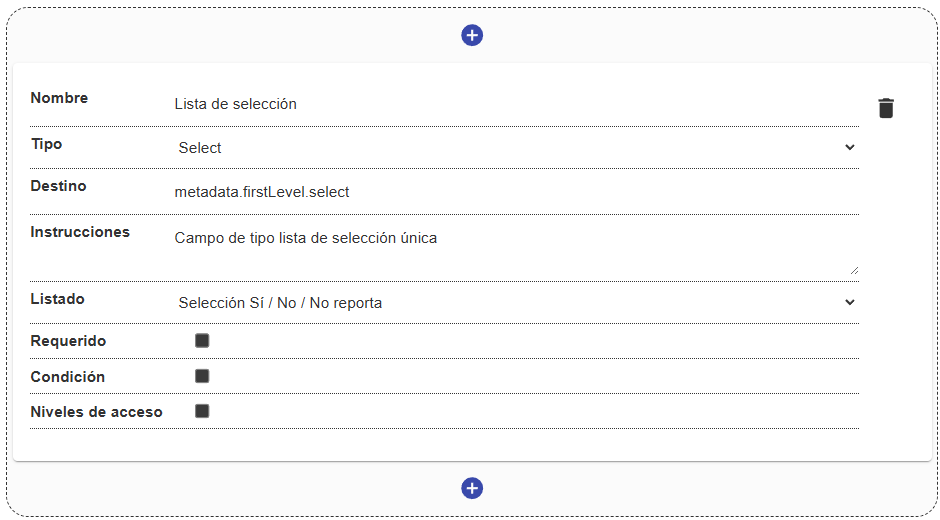
The List field (internally select) allows the user to choose a single option from a predefined set of values. It is essential for ensuring data consistency and normalization (for example, document types, statuses, categories).
Field Structure
Section titled “Field Structure”This field relies on the lists (controlled vocabularies) configured in the system:
Name:
- Description: The label that identifies the field.
- Example:
"Department","Resource type".
Destination:
- Description: The key in the metadata where the identifier or value of the selected option will be stored.
- Example:
metadata.firstLevel.document_type.
Options / Source list:
- Description: The identifier of the system list from which the dropdown options will be pulled. Options are loaded dynamically.
Instructions:
- Description: Optional guidance for the user.
- Example: “Select the main category that applies to the resource.”
Required:
- Description: Indicates whether selecting an option is mandatory to continue.
Condition and Access levels:
- Description: Rules for showing/hiding the field or restricting which roles can modify it.
Behavior in the interface
Section titled “Behavior in the interface”- It is displayed as a dropdown menu (Select / Autocomplete).
- By default, it usually includes an empty option such as
"Select an option". - It supports built-in search (autocomplete) when the list of options is extensive, helping the user quickly find the desired value.
