
The Multiple Selection Field
The Multiple Selection field (internally select-multiple2) is similar to the List field, but allows the user to simultaneously choose several options from a predefined set. It is ideal for assigning multiple tags, topics, or statuses to a single resource.
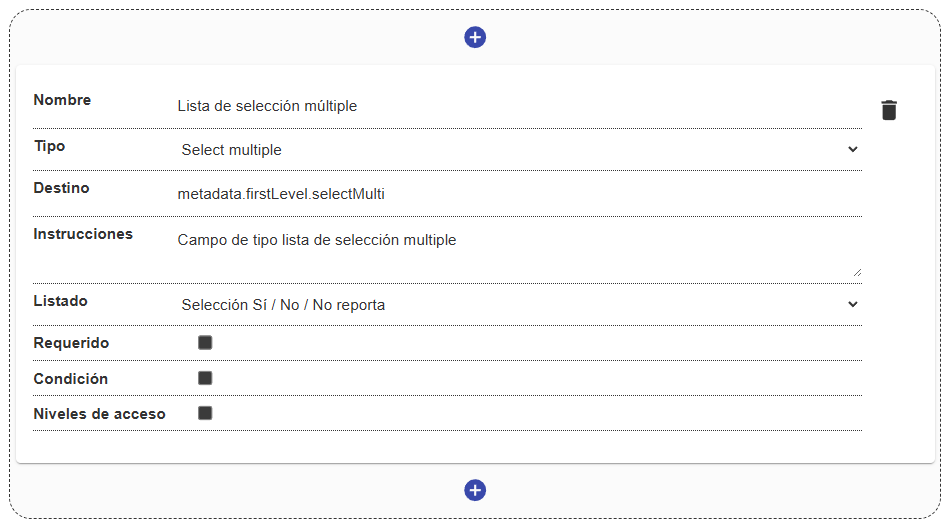
Field Structure
Section titled “Field Structure”Name:
- Description: The field’s label.
- Example:
"Related topics","Tags".
Destination:
- Description: The key where the array of selected values will be stored.
- Example:
metadata.firstLevel.topics.
Options / Source list:
- Description: The system list that provides the available values.
Instructions:
- Description: Additional guidance for the user.
- Example: “Select all the topics covered in this document.”
Required:
- Description: If enabled, requires that at least one option from the list be selected.
Condition and Access levels:
- Description: Allow setting conditional logic and controlling which user profiles interact with the field.
Behavior in the interface
Section titled “Behavior in the interface”- It is usually rendered as an autocomplete text field where each selected option becomes a “pill” or chip.
- The user can quickly search for, add, and remove options through the chip interface.
- At the data level, it is stored as a list or array of values in the metadata schema.
