
The Text Field
The text field allows the entry of text in a single line. It is the most commonly used field type for capturing short information such as names, titles, or identifiers.
Field Structure
Section titled “Field Structure”When configuring a text field in a form, you have the following properties available:
Name:
- Description: The label or title the user will see on the form.
- Example:
"Document title","Author's name".
Destination:
- Description: The key or path in the metadata where the value will be stored (for example, within the database schema).
- Example:
metadata.firstLevel.title.
Instructions:
- Description: Optional help text shown to the user when interacting with the field’s help icon.
- Example: “Enter the full title of the document as it appears on the cover.”
Required:
- Description: Indicates whether the field must be filled in order to save the resource.
Condition (Optional):
- Description: Allows configuring the field’s visibility based on the value of another field in the same form. Useful for dynamic forms.
Access levels (Optional):
- Description: Restricts which user roles can view or edit this field.
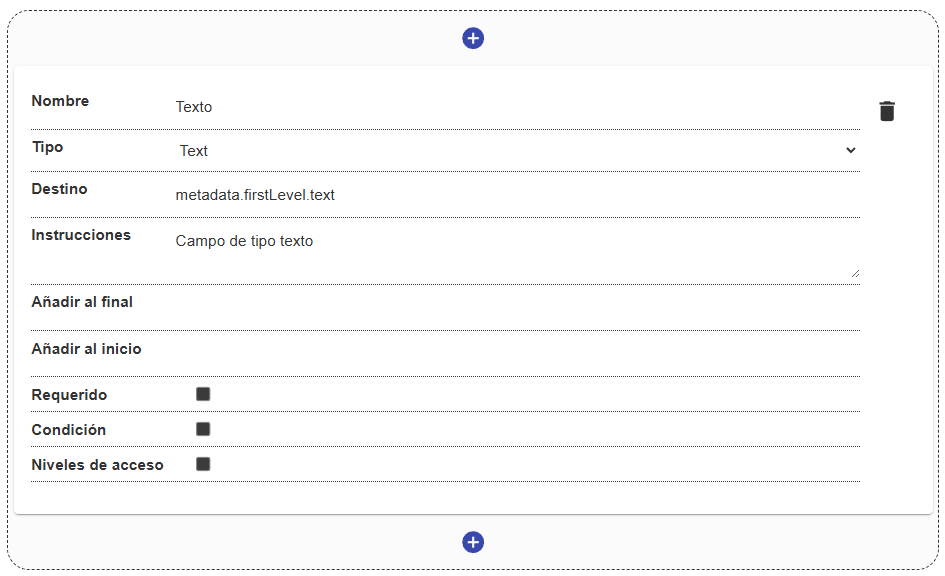
Display example
Section titled “Display example”When the user interacts with a text field, they will see a standard single-line input. If the field has instructions, a help icon will appear next to the name.
(Note: Advanced validation options such as maximum length or email format depend on backend-level configurations, not directly on the field’s basic visual structure).
