
Guide to Create a Plugin
Guide to create a Plugin
Section titled “Guide to create a Plugin”Our commitment to the development of ArchiHUB as an open source project goes beyond the creation of the freely licensed tool. We also want to encourage contributions from ArchiHUB’s users, allowing anyone to extend ArchiHUB’s functionality by developing plugins. In this section, we will guide you through the process of creating a plugin for ArchiHUB.
What is a Plugin?
Section titled “What is a Plugin?”A plugin is an additional module that can be integrated into ArchiHUB to extend its functionality. Plugins can be used to add new features or even integrate ArchiHUB with other tools and services.
As an example, we have the plugin for audio and video transcription that allows users to automatically transcribe the content of their media files using OpenAI’s Whisper model.
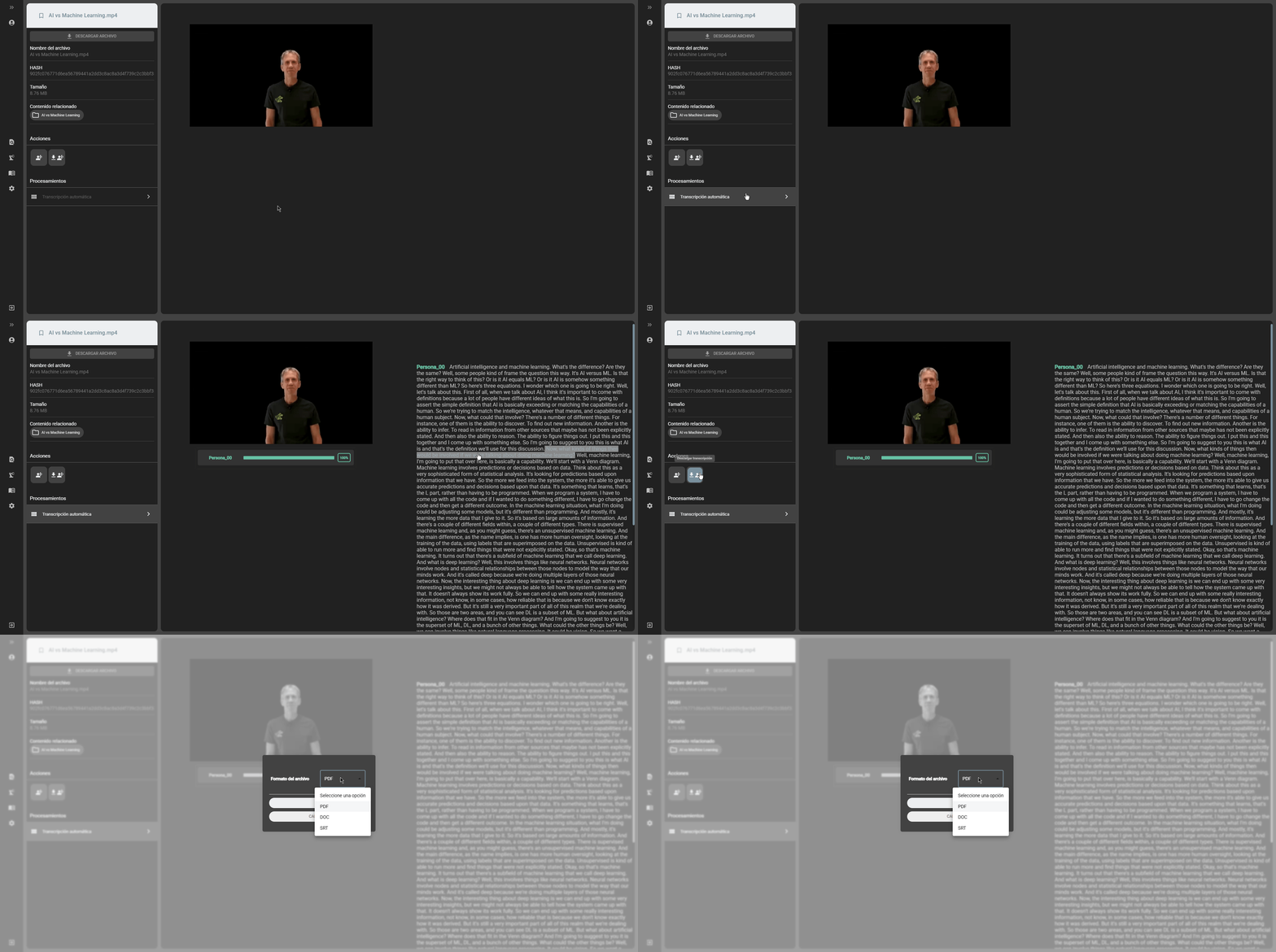
In this guide we are going to develop a plugin that allows the integration of ArchiHUB with the OpenAI API. This plugin will allow ArchiHUB users to modify resource titles using artificial intelligence.
Plugin structure
Section titled “Plugin structure”A plugin is a Python package inside the archihub/plugins/ folder of the backend repository. The plugins that ship with the backend make a good starting point: liquidText and inventoryMaker are examples of bulk tasks and file downloads.
ArchiHUB plugins always contain the following parts:
- Structured plugin information: a
plugin_infodictionary with the plugin’s basic information and the fields the frontend shows to configure it. - The plugin class: a subclass of
ArchiPluginthat defines its endpoints in theadd_routesmethod. - Tasks: Celery functions (
@shared_task) that run in the background on the processing nodes. - The
build()function: returns an instance of the plugin. ArchiHUB only loads plugins whose__init__.pydefinesplugin_infoandbuild().
Creating a plugin
Section titled “Creating a plugin”As a first step, we must define a functionality and a name for the plugin. In this case, we are going to create a plugin that allows modifying resource titles using the OpenAI API. The name of the plugin will be titleModifier. The steps to create the plugin are described below:
- Create the plugin folder: create a folder with the plugin name in the backend’s
archihub/pluginsfolder. In this case, the folder will be namedtitleModifier. - Create the plugin file: inside the plugins folder you must always create a
__init__.pyfile. In this case, create the__init__.pyfile inside thetitleModifierfolder. - Define the plugin logo: the plugin logo should be saved in the
staticfolder inside the plugin folder with the nameimage.png. In this case, save the plugin logo in thetitleModifier/static/image.pngfolder. - Define the plugin dependencies: if the plugin requires additional dependencies, these must be defined in the
requirements.txtfile inside the plugin folder. In this case, the plugin requires theopenailibrary, so create therequirements.txtfile inside thetitleModifierfolder with the following content:
openaiA trailing newline is no longer required: the installer reads the file line by line and accepts comments (#).
If a dependency is installed from a git repository, append #egg=<distribution-name> to the URL. Without it the package name cannot be derived from the URL, so the declaration cannot be checked against what the code imports:
git+https://github.com/openai/whisper.git#egg=openai-whisper4.1. Declare system packages: if the plugin needs a system program (ffmpeg, tesseract-ocr, …), declare it in a packages.txt file inside the plugin folder, one apt package name per line. These are installed when the image is built.
# Converts audio and video before transcribing.ffmpegThis is not optional. There was no such file before, so authors wrote the requirement as a comment inside requirements.txt, where the build step deleted it. The result was a plugin that installed cleanly and failed at its first task with a FileNotFoundError for a binary nobody had installed.
Each line must be a package name (^[a-z0-9][a-z0-9+.-]*$). Anything else is refused at build time, because this folder is third-party content and its contents are handed to a command running as root.
- Define the plugin environment variables: if the plugin requires additional environment variables, these must be defined in an
.envfile in the plugin folder. In this case, the plugin requires theOPENAI_API_KEYvariable with the key generated in the OpenAI account:
OPENAI_API_KEY=your-keyThe .env file holds credentials, so it is not committed to the repository or included in the image. Commit a .env.example file instead, with the same variables and no values: it is what whoever installs the plugin reads.
The plugin reads its variables through the framework’s config module, never with load_dotenv(), which would change the environment of the whole process and affect every other plugin:
from archihub.plugins.framework import config
api_key = config.get('titleModifier', 'OPENAI_API_KEY', required=True)
With required=True, a missing variable raises an error naming the plugin and the variable, instead of returning an empty string that would fail somewhere later.
- Write the plugin information: the plugin code goes in the
__init__.pyfile. To start, define the plugin information in theplugin_infodictionary:
plugin_info = { 'name': 'Plugin para modificar títulos de recursos usando la API de OpenAI', 'description': 'Plugin para modificar títulos de recursos usando la API de OpenAI', 'version': '0.1', 'author': 'BITSOL SAS', 'type': ['bulk'], 'settings': { 'settings_bulk': [ { 'type': 'instructions', 'title': 'Instrucciones', 'text': 'Este plugin permite modificar títulos de recursos usando la API de OpenAI. Para usarlo, selecciona los archivos que quieres modificar y configura las opciones del plugin.', }, { 'type': 'select', 'label': 'Modelo', 'id': 'model', 'default': 'gpt-3.5-turbo', 'options': [ {'value': 'gpt-3.5-turbo', 'label': 'GPT 3.5 Turbo'}, {'value': 'gpt-4o', 'label': 'GPT 4o'}, {'value': 'gpt-4o-mini', 'label': 'GPT 4o Mini'}, {'value': 'gpt-4o-turbo', 'label': 'GPT 4o Turbo'} ], 'required': False, }, { 'type': 'text', 'label': 'Instrucciones', 'id': 'instructions', 'default': 'Tengo una herramienta de gestión documental con varios recursos y quiero que me ayudes a reescribir el título de esos recursos para que sean más atractivos y llamen la atención de los usuarios usando pocas palabras. Además, debe estar en español.', 'required': True }, { 'type': 'text', 'label': 'Comando para GPT', 'id': 'input', 'default': 'Por favor, reescribe el siguiente título de un recurso:', 'required': True } ] }}- Write the plugin class and its endpoints: endpoints are declared in the
add_routesmethod, onself.router. Every route is placed under the plugin’s name, so the/bulkroute is published as/titleModifier/bulk, which is what the frontend’s processing screen calls:
import logging
from celery import shared_taskfrom fastapi import Body, Depends
from archihub.core.responses import json_responsefrom archihub.core.security.jwt import CurrentUserfrom archihub.plugins.framework import configfrom archihub.plugins.framework import data as plugin_datafrom archihub.plugins.framework.base import (    ArchiPlugin,    BrokerUnavailable,    object_ids,    queue,    require_roles,)
logger = logging.getLogger(__name__)
SLUG = 'titleModifier'TASK_BULK = 'titleModifier.bulk'

class TitleModifier(ArchiPlugin):    def add_routes(self):        plugin = self
        @self.router.post('/bulk', status_code=201)        def bulk(            body: dict = Body(...),            current_user: CurrentUser = Depends(require_roles('admin', 'processing')),        ):            if not body.get('post_type'):                return json_response({'msg': 'No content type was specified'}, 400)
            error = plugin.validate_settings_fields(body, 'bulk')            if error:                return json_response({'msg': error}, 400)
            try:                queue(bulk_task, TASK_BULK, current_user.username, 'msg', body, current_user.username)            except BrokerUnavailable:                return json_response({'msg': 'The processing queue is unavailable'}, 503)
            return json_response({'msg': 'The task was added to the processing queue'}, 201)
Note how permissions are checked: Depends(require_roles('admin', 'processing')) is resolved before the endpoint runs, so only users with the admin or processing role reach it; everyone else gets a 403 error without the endpoint running at all. This matters because the plugin modifies resource titles, and not every user should have access to that. A plugin always declares its permissions this way, never with a check inside the endpoint.
validate_settings_fields checks that the request carries the fields marked as required in settings_bulk. The queue function sends the task to the processing queue and records it in the user’s profile; its second parameter is the task name, which identifies it in the database. If the queue is unavailable, queue raises BrokerUnavailable and the endpoint answers 503 instead of confirming a task that will never run.
- Write the tasks: tasks are Celery functions defined at module level:
@shared_task(ignore_result=False, name=TASK_BULK, queue='low')def bulk_task(body, user):    from openai import OpenAI
    from archihub.infra.mongo import get_mongo
    client = OpenAI(api_key=config.get(SLUG, 'OPENAI_API_KEY', required=True))
    filters = {'post_type': body['post_type']}    if body.get('resources'):        filters['_id'] = {'$in': object_ids(body['resources'], 'resources')}    elif body.get('parent'):        parent = object_ids([body['parent']], 'parent')[0]        filters['$or'] = [{'parents.id': body['parent']}, {'_id': parent}]
    resources = list(get_mongo().get_all_records(        'resources', filters, fields={'metadata': 1, 'post_type': 1}    ))    if not resources:        return 'No resources were found to process'
    updated = failed = 0    for resource in resources:        metadata = resource.get('metadata') or {}        title = (metadata.get('firstLevel') or {}).get('title')        if not title:            continue        try:            response = client.responses.create(                model=body['model'],                instructions=body['instructions'],                input=f"{body['input']} {title}",            )            metadata['firstLevel']['title'] = response.output_text.strip()            _, status = plugin_data.update_resource(                str(resource['_id']),                {'post_type': resource['post_type'], 'metadata': metadata},            )        except Exception:            logger.exception('Could not modify the title of %s', resource['_id'])            failed += 1            continue        if status == 200:            updated += 1        else:            failed += 1
    return f'{updated} titles modified, {failed} failed'
The task reads each resource’s original title, sends it to the OpenAI API to be rewritten and saves the result. Some guidelines this example follows:
- Heavy imports go inside the task (
openaihere). The__init__.pyfile is also imported by the backend process, which does not run tasks, and should not load libraries there that it does not use. update_resourcesaves the changes, validating them against the content type’s form exactly as a user’s edit is validated, and updates the search index. Since the update replaces the wholemetadatafield, the task sends all of the resource’s metadata, not just the title.- One failing resource does not stop the task: the error is logged and counted, and the task moves on to the next one. The result says how many were modified and how many failed.
object_idsconverts the identifiers it receives and refuses invalid ones with a clear message.- There is no need to clear the cache: every database write automatically invalidates the cached queries that depend on it.
- Define the
build()function: at the end of the file, afterplugin_info, define the function ArchiHUB uses to load the plugin:
def build(): return TitleModifier(SLUG, plugin_info, module_file=__file__)Processing row
Section titled “Processing row”The plugin runs in a processing queue. This means that when a task is sent to the plugin, it is added to a queue and processed in the background. This is useful to distribute the tasks to different workers and avoid performance problems if everything runs on the same machine and processing queue. In this case, the plugin uses the low queue to process the tasks. The default processing node does not consume the high, medium and low queues: for the task to run, a node for those queues must be running, such as the celery_worker_queues service described in the advanced configuration. If the task is light, you can leave out the queue parameter and it will run on the default queue. For more information on processing queues, see the ArchiHUB documentation.
Frontend interaction fields
Section titled “Frontend interaction fields”For frontend interactions, fields are defined from the plugin_info variable. This variable contains the plugin information and is used to display the information in the ArchiHUB interface. In this case, different field types are being used:
- instructions: used to display an instruction text to the user. This field is not editable and is only shown as information.
- select: is used to display a selection field to the user. In this case, it is being used to select the OpenAI model to be used to modify the title.
- text: is used to display a text field to the user. In this case, it is being used to display the instruction field and the command field for GPT.
Note: in case you require other types of fields, feel free to open an issue in the repository where the ArchiHUB frontend is located. We will be happy to help you implement it. Remember that ArchiHUB is an open source project and we are open to receive contributions from the community.
Plugin repository
Section titled “Plugin repository”To facilitate the understanding of the guide, we have created a repository where you can find the developed plugin. Note that the repository holds the plugin’s version for ArchiHUB 1.x; the code in this guide is for version 2.0. To install a plugin, follow the plugin installation instructions.